The investigation into 'Do speed cameras save or cost money?' has been gathering some interesting information in the past few weeks.?
A blog post on 'Cycling around Hull' sums up the story so far: based on figures from the safety camera program "From 2000 to 2007 the average revenue [money made] was ?10 million/yr." So why are councils scrapping the schemes? Because it's the Treasury that gets that revenue, not local authorities.? "The safety camera program is funded centrally and receipts are passed back to government. Government has cut central funding by about 1/3 while still taking receipts leaving roughly a ?38 million hole." Meanwhile,? "An interesting figure to note is the cost of personal injuries of prevented accidents, the?The national safety camera programme: four-year evaluation report?estimates this roughly amounts to ?258 million for 2003/4. "To put things in perspective the same report claims total cost of road accidents (including property damage, police and insurance costs) in 2002 was ?17.8bn." The investigation still needs to gather more information. If you want to help – or are just curious – join in at http://helpmeinvestigate.com/investigations/179.Author Archives: paulbradshaw
Help investigate the mystery ClimateCamp oil slick – the story so far
Over the weekend an investigation has been progressing into police claims of an "extremely reckless and dangerous act" that they linked to Edinburgh's ClimateCamp.
In their press release last week,?Lothian and Borders Police put out a press release stating that around 9.30am "it was discovered that two arterial routes to Edinburgh were badly affected after a substance similar to diesel or vegetable oil was poured onto the carriageways. "City of Edinburgh Council had to use 7.5 tonnes of grit to clean the A720 at Bankhead and the west bound A8. "Lothian Buses removed its vehicles from the roads for a spell while the cleaning operation was carried out. The roads were never closed, but Police urged motorists to proceed with caution until noon when the road was clear once more." Despite the press release being widely reported in the press, investigations on the site have so far found no evidence of any oil slick on the A720 or A8 in records from Traffic Scotland or the UK Traffic Reports Archive, which?aggregates (and stores) traffic updates from the UK highways agency, and Traffic Scotland, amongst other bodies. Guardian Local in Edinburgh have submitted a Freedom of Information (FOI) request on the matter. The police have suggested they re-apply in two months.? Other members of the investigation have submitted separate FOI requests on separate matters. The investigation still needs help following up avenues with possible witnesses and other bodies that would have been affected by such an oil slick. If you want to join in, sign up at http://helpmeinvestigate.com/investigations/187 – and if you need an invite, just drop me a line on paul (at) helpmeinvestigate.comMore of The Guardian, website expenditure, crowdsourcing visualisations and THAT Birmingham City Council website…
Since last week’s blog post, the Guardian, having had the data thrown their way by a couple of freelance journalists at Peopleperhour, have made the website expenditure across all the UK councils public and the data is now available online.
It’s a shame that the link to the Guardian’s Manyeyes visualisation is a broken one, but it’s interesting that they have thrown data out to the audience to crowdsource visualisations and host them on their own Flickr group.
It’s a great chance to play around with a goldmine of data that is both contemporary and relevant, and there are some great examples up already.
So, to summarise, every council’s spending on websites is up there, and ten have spent over £100,000, including the over-exuberant Birmingham City Council, pushing way out in front with £2,800,000. And the data is all there for you to use.
The Birmingham.gov controversy, as told by The Telegraph…
Sometimes, it?s nice to sit back and read through the results of a hugely successful investigation. Even nicer when we kicked the whole thing off.
The Telegraph online reported on Monday that ?councils are spending millions on redesigns of their websites despite facing the biggest funding cuts in their history?, with a story originating from a Helpmeinvestigate investigation into the Birmingham City Council website renovation.
The proposed website renovation had been announced in 2007 but was nowhere to be seen until 2009, and was supposedly being outsourced by private hire IT firms.
But, those working on the investigation could have had no idea as to the extent of the spending that was going on; after it was unveiled in 2009, investigations revealed that the total cost had ballooned from a proposed ?580,000 to an incredible ?2.8 million.
When the Birmingham Post reported the costs in September of 2009, Helpmeinvestigate finally had a result, and one that was clearly massively newsworthy.
The report written by Nick Booth (@podnosh) provides an appropriate conclusion to the story and offers an element of riposte on behalf of Birmingham City Council.
Birmingham City Council have come under further scrutiny however as a result of the Telegraph report, which has looked in further detail at the spending on council websites across all the counties of the UK and has placed Birmingham City Council as the highest spenders.
By spending over three times as much as any other council.
And 28 times the mean.
In fact, one third of the entire website redesign spending figures for the UK belonged to Birmingham City Council.
The full chart and figures are on the Telegraph article, including the raw data from the FOI requests made by themselves and peopleperhour.com.
It will most likely come as no surprise to most of the people working on the investigation that Birmingham City Council topped the chart, but the degree to which they have seemingly overspent has been magnified by the relatively moderate spending of most council.
It is by no means a bad thing that the council tried, back in 2007, to show that it was aiming to be in touch with the more technological aspects of serving the public but have those good intentions been overshadowed now?
A brief introduction to Computer Assisted Reporting
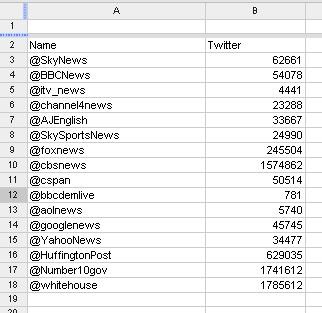
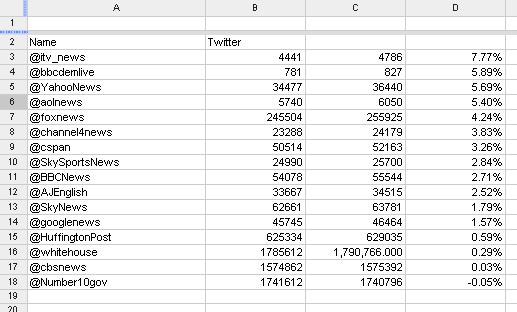
– As Heather Brooke recently said, increasingly it is through CAR that journalists are finding their exclusives The first step, according to David Donald, in CAR is learning how to use a spreadsheet. I’m using Google Spreadsheets so you can view these figures yourself (they also offer nice tutorials on how to start using spreadsheets) Once you’ve got your set of data you’ll have something that looks like this;
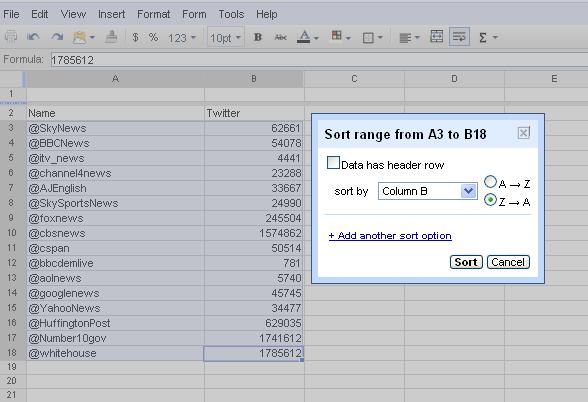
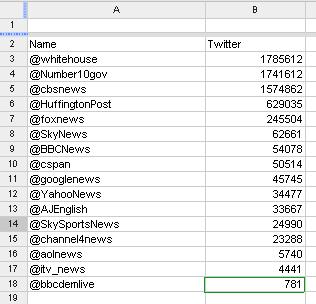
*This spreadsheet shows the number of twitter followers of major news organisations in the UK and US – and the White House and Downing Street to add some intrigue . This data however doesn’t really tell that much of a story – to find the interest we first have to establish a base on which to work from. This is done by ‘sorting’ the data. To sort – highlight all desired cells, click tools –> sort –> the column you want sorting (in this case it is B as I’m arranging the data by number of followers) –> select high-to-low/low-to-high –> sort, and you’re away.
This then gives this;
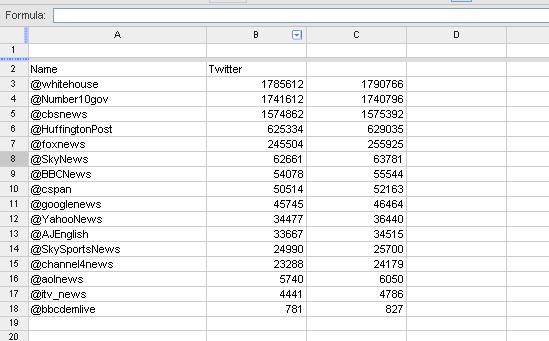
Using the ‘Formula’ box we can then enter a calculation that will work out the rate of change for each twitter account (as the answer is to go in cell D3, this cell must be selected first). THe equation for this is;
= (new number (C3) – old number (B3) ) / old number (B3)
which gives you;
=(C3-B3)/B3
You can then use the the blue square at the bottom of the D3 square to drag that formula into all other cells beneath – giving you 18 ‘rates of change’ in a very short space of time indeed.
By then highlighting the D column and ‘sorting’ again, you can now see who is proportionately attracting new followers the quickest (highlight the column again and click the % box in the tool bar to put figures into percentages)– median = C3:C18 (the middle value – interesting to compare the average) Relevant tit-bits of information – – the AP style guide recommends giving numbers to 2 decimal places
– if you are starting with imprecise (often rounded numbers) then don’t use decimal places at all as this will only further distort the data
– audiences enjoy being able to see figures and do their own equations – so use the figures as much as possible and don’t clog up the report with unnecessary narrative (as I probably have with this).
– when requesting data, always ask for it un-aggregated and raw
Examining election expenses – What to look for.
- Any claims that are split between long and short campaigns, or local and general elections, or different candidates
- Any claims where only part of the cost is declared, i.e. there are ‘unused’ leaflets etc. that are not included.
- Any companies providing services – do they have a connection with the party? (Try to find out who the directors are)
- Any costs that are higher than equivalents from other candidates – this might be best shown through a spreadsheet that shows: cost; number of leaflets etc.; cost per leaflet/etc.; company
Initial impressions from Birmingham’s Hall Green & Edgbaston election expenses
Armed with my Apple Mac and a spongy wrist cushion, I set about the task at hand, as I waded through over 100 PDFs of Councillor capital to pinpoint where exactly the funds were going and how effective this use was to us as voters.
After 2 days of tagging and forwarding receipts for anything from sound speakers to sellotape, I had concocted a list of my most interesting finds…
- The amount of times I must have tagged the word ‘leaflets‘ into my Hotmail subject window was untrue. It seems that on almost every receipt I looked over there was a charge for leaflets. Small, large, double-sided, full-colour, singing & dancing, they were all there. But this just makes me question ‘are they really getting their money’s worth?’ For example, how many of us actually sit deep in thought about a flyer that comes through our letter box? In all truthfulness it’d be lucky if it got a quick glance before being chucked straight into the paper box. Recycle, recycle.
- On a few receipts, I noticed details of ‘equipment hire’… from themselves. I can’t understand how the Liberal Democrats could charge themselves for equipment lease and then reimburse themselves?
- I was surprised to find on a number of occasions that some of the candidates had been ‘fined‘ for varying reasons, and this had also been taken out of funds. One example of this was a fine for failing to returned leased goods from a sound company. Apparently only 3 out of 4 megaphones had been returned! Why didn’t they just return them all?
- On a few of the expenditure breakdowns, there was a whole host of food receipts for staff. Mostly from ‘Papa John’s‘.
- Now the expense that really wound me up was the ridiculous amount of money spent on ENVELOPES! Just on 6 sets of receipts I totted up a gigantic bill of £3,269.20!! ‘Blue envelopes’, ‘white envelopes’, ‘TNT envelopes’, & even ‘reinforced envelopes’ were purchased in their tens of thousands. On one receipt in particular one candidate forked out on 90,000 ‘windowed envelopes’ costing a whopping £1,054! And the best about it is over 20,000+ weren’t even used!
To view images of Birmingham’s Hall Green expenses, click here.
To view images of Birmingham’s Edgbaston expenses, click here.
How many databases does Birmingham City Council hold or access?-The Findings.
Birmingham City Council inform us that they have over 1,300 databases – but that they do not know exactly how many, and have no central list on what those are.
Most of the databases are developed and managed by Service Birmingham, who say it would be too expensive to find out that information. So, what have we found out?…
- Customer complaints
- Compliments
- Elections register
- Comments
- Marketing communications lists
- “etc”
- Education files
- Admission appeals
- Social care files
- Disability register
- Leisure centre membership
- CCTV
- Burial plots
- Street traders
- Anti social behaviour
- Neighbourhood advice
- Tenancy files
- Complaints
- Homeless lists
- Rent arrears
- Benefit claims
- Data matching
- Landlords
- Residency
- Council tax
- Benefit claims
- Land charges
- Care records
- Blue badge information
- Protection Lists
- Police checks
- Planning applications
- Highways CCTV
- Parking control
- Grant
- Home improvements
- Travel plan information
Tips on Freedom of Information requests from James Ball
A couple months ago James Ball came to spend a day teaching Freedom of Information and other skills to the MA Online Journalism students at Birmingham City University. Here are some of his tips:
- Ring the body before you send any FOI request (their press office, for example) and make it clear that a refusal to provide the information you're asking for will make a really good story too, e.g. 'Culture of secrecy'
- Avoid asking for personal information – individuals and junior staff are exempt (but not senior staff, i.e. at Level 5 or above of the civil service scale; Director level and other senior staff – e.g. heads of departments – at a local level)
- Ask for information to be 'anonymised if necessary' to avoid being refused on privacy grounds
- Ask for street-level detail where possible and relevant
- Ask for minutes of meetings: steering groups, advisory boards – and ask for the names of the members of those groups
- If they limit information on the basis of possible 'patchwork' identification argue the case on why it makes little difference
- If the FOI is refused, ask for it to be taken to internal review and make your case strongly. Internal reviews should be completed within 40 working days. If it fails then, you can take it to the Information Commissioner, but this is likely to take a further 6-12 months at least (some 5-year-old appeals are still waiting for judgements). The story then is likely to be that they have been that they were 'forced to reveal'. Beyond this it goes to the Information Tribunal (you will need a lawyer) and the High Court.
- Keep up to date with information commissioner rulings at http://www.ico.gov.uk/tools_and_resources/decision_notices.aspx – create a crib sheet of useful rulings to quote and a register of databases mentioned
If you have any other tips, please let us know in the comments.
The logic behind putting election expenses online
I've previously blogged about how to get hold of your local election campaign expenses, and how to easily put them online – but I thought I'd add a third post explaining why I decided to put them online in the form that I did.
I've scanned each expense document (the return forms; each appendix; and each receipt) separately and emailed them to Posterous separately, so that each has its own blog post. This means that each expense document has a unique URL, so people can link directly to it when talking about it. If all documents were put into a single PDF or all PDFs put into a single blog post it would make it more difficult for people to identify which document was being talked about. Separating the documents this way also means that people can comment on individual documents, so it's easier to keep track of which documents have been looked at and which not. Comments also make it easy to find individual posts, as the comment text itself will appear in search engines. And finally, it means that each blog post – i.e. document – can be tagged separately. Tagging is possibly the most important part of the whole process, for a number of reasons:- It makes it much easier to find the documents on a search engine. Sites such as Google use tags to understand the content of a page – this is particularly important when dealing with PDFs, as Google cannot 'read' them in the same way it can read plain text.
- It also makes it much easier for users to find particular types of documents when browsing the blog itself. The right hand column of the blog has a list of tags that you can click on so that, for example, you are only looking at the expenses of the Labour Party, or documents relating to the short campaign.
- This also makes it possible for people to link to specific types of documents, in addition to individual ones, or the blog as a whole.
- Finally, tags make it possible to do interesting things with computer scripts. Someone could, for example, write a script to find every document tagged with a particular company name across a number of areas, or to combine results with two tags, or either of two tags.
If you have any other ideas for better ways of putting the material online, let me know.